Users
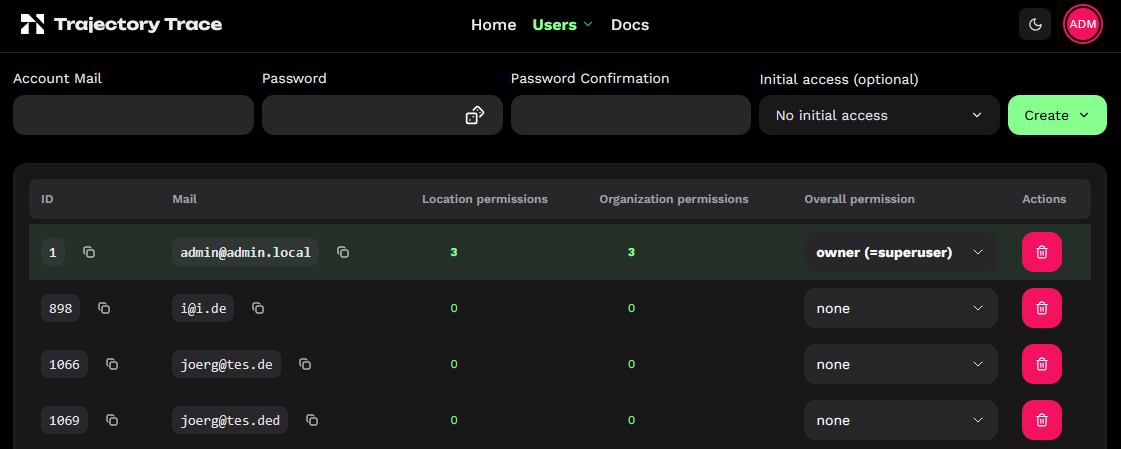
Sign in and select Users from the account menu. Your own account appears first in bold. Owners also see users with permissions in scopes they manage; superusers see all accounts. The Users / Organizations dropdown in the navigation bar switches between these views.
Permission Levels
| Level | Allowed actions |
|---|---|
| Viewer | View locations and data, and use temporary geofences. |
| Maintainer | Viewer access plus normal settings, events and saved geofences. |
| Owner | Maintainer access plus critical settings and managing permissions. |
Permissions apply to one location, an organization and all its locations, or overall access to all organizations and locations. The highest applicable level wins. An overall owner is a superuser. Public locations remain viewable without login or permissions.
Create User
Owners can create accounts using the row above the table:
- Enter the account email, password and confirmation. Use to generate a random password and fill both password fields.
- Select
Initial accessand a permission level for a location or organization you own. Initial access is optional for superusers. - Open
Createand choose to copy the password to the clipboard or prepare an email with the credentials. The email option opens a draft in your mail application; send it yourself. If clipboard access is unavailable, copy the password before completing creation.
Emails are stored in lowercase. The password is no longer shown after creation.
Change Permissions
Click a number under Location permissions or Organization permissions to view explicit permissions and add, change or remove them where authorized. Counts exclude inherited access. Location permissions also show the parent organization. Superusers can edit Overall permission directly in the main table.
Removing one permission leaves other applicable permissions intact. Giving up your own ownership requires typing GIVE UP OWNERSHIP; another authorized owner must restore it. The last superuser cannot be removed. Accounts may remain without permissions, and only superusers can delete accounts.