Organizations
Select Organizations from the account menu, or switch from Users using the navigation dropdown. Only organizations covered by your organization or overall permissions are shown.
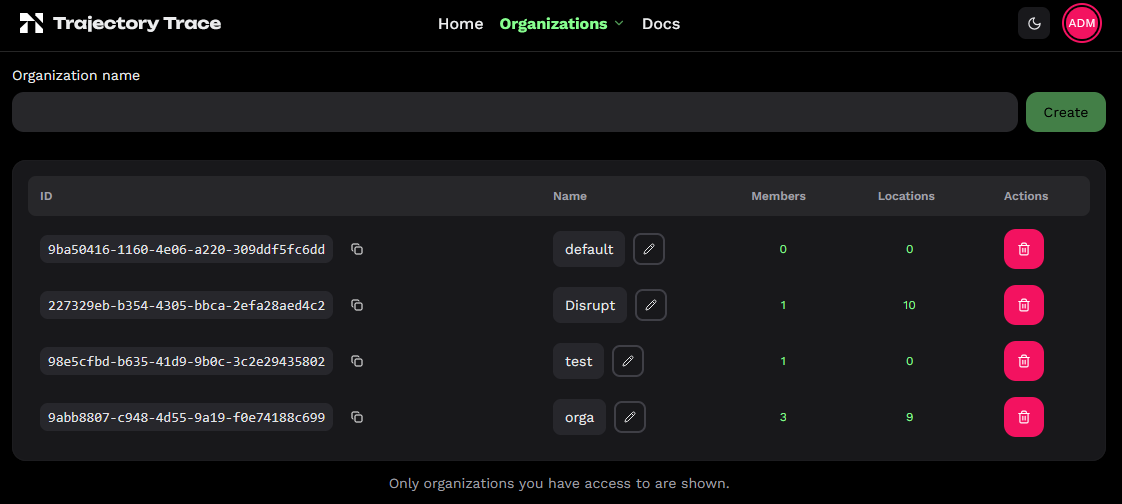
The table lists each organization's ID, name, member count and location count. Superusers can create an organization using the row at the top. Maintainers and owners can use to edit its name; owners can delete it and its locations.
Members
As an organization owner, click the Members count to view users with explicit permission for that organization. Enter an existing email and choose a permission level to add a member. Change a member's level in the table, or select none to remove the organization permission.
Organization permissions apply to all current and future locations in the organization. The count excludes users with only overall or direct location permissions. Removing membership leaves those other permissions intact. Create new accounts on the Users page.
Locations
Click the Locations count to view the organization's locations. To move a location, you must own both its current and destination organizations. Choose the new organization and review the direct location permissions before confirming: those permissions remain, while inherited organization access changes.